


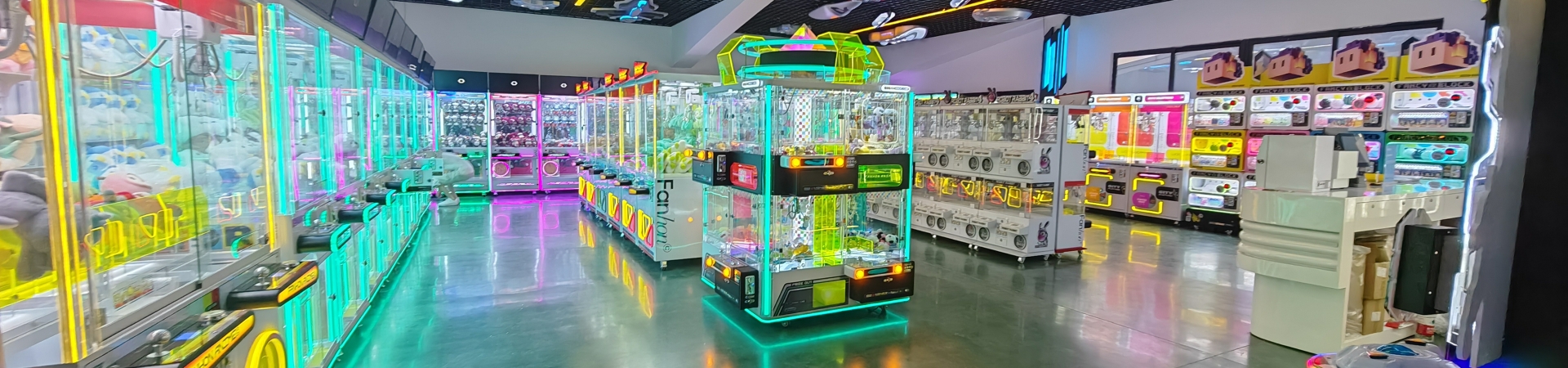
Arcade Machine Ergonomics and Player Comfort Guide: Designing for Long-Term Play
Arcade machine ergonomics and player comfort are the design principles focused on making commercial arcade equipment physically comfortable and accessible for users. For B2B buyers operating claw machines, prize machines, and arcade games, ergonomic design directly impacts how long a customer plays, how much they spend, and whether they return. A machine that causes back pain, eye strain, or physical frustration will quickly lose players. Proper cabinet height, intuitive control layouts, adequate seating, and optimized lighting are essential for a modern, welcoming venue.
This guide explains the key ergonomic considerations from a manufacturer's perspective.
Why Ergonomics and Comfort Matter
Arcade play is a physical experience.
Good ergonomics help venues:
Increase playtime and average spend
Reduce player fatigue
Improve accessibility for different age groups
Create a more professional, premium atmosphere
Differentiate from poorly designed competitors
Build a loyal customer base
Comfortable players stay longer and play more.
Cabinet Height and Accessibility
Machine height affects who can play.
Considerations:
Standard Height: Designed for average adults (controls at waist/chest level).
Kiddie Height: Lower cabinets specifically for toddlers and young children.
Adjustable Stools: Useful for taller racing or shooting games.
Screen Angle: Screens should be tilted slightly upward toward the player's eye level to reduce neck strain.
Ensure the machine accommodates the target demographic.
Control Panel and Layout Design
The control panel is where the player interacts with the game.
Best practices:
Place joysticks and buttons at a natural, relaxed angle.
Ensure buttons are easy to reach and press without excessive force.
Use high-quality, responsive micro-switches.
Provide clear spacing between controls to prevent accidental presses.
Use tactile, durable materials.
For claw machines, ensure the joystick and drop button are positioned for quick, intuitive control.
Seating and Posture for Longer Games
Games like racing, shooting, and redemption require seating.
Consider:
Racing Simulators: Bucket seats with adjustable positioning.
Redemption/Video Games: Bar stools or high chairs with footrests.
Party/Relaxation Zones: Comfortable lounge seating for parents and waiting guests.
Seating should support good posture and prevent fatigue during longer play sessions.
Lighting and Visual Comfort
Harsh lighting causes eye strain.
Design considerations:
Avoid direct glare on screens or glass panels.
Use diffused LED lighting for cabinet illumination.
Ensure the room lighting is balanced (not too dark, not overly bright).
Add anti-glare coatings to screens where necessary.
Use colored lighting to create atmosphere without causing discomfort.
Lighting should highlight the machine without blinding the player.
Sound and Noise Management
Audio contributes to the experience but can cause fatigue.
Consider:
Adjustable volume controls for each machine.
Directional speakers to keep sound localized.
Soundproofing or zoning for noisy machines (e.g., dance games).
A balanced overall soundscape in the venue.
Players should be able to hear the game clearly without shouting.
Accessibility and Inclusive Design
Ergonomics must include users of all abilities.
Consider:
Wheelchair-accessible control panels.
Clear floor space around machines for mobility devices.
Clear, readable fonts on screens and instructions.
Color-blind friendly graphics where possible.
Inclusive design expands the potential customer base.
Common Ergonomics and Comfort Mistakes
Operators sometimes make avoidable mistakes:
Buying cabinets that are too high or too low for the target audience.
Cramming machines too close together, limiting player space.
Using cheap, unresponsive buttons that cause hand fatigue.
Ignoring screen glare from overhead lighting.
Failing to provide seating for longer games.
High noise levels that make the venue unpleasant.
These mistakes can drive players away.
Practical B2B Insights
From a manufacturer's perspective, ergonomics should be planned before production.
First, match the cabinet height to the primary demographic (kids vs. adults).
Second, design control panels for natural hand and wrist positioning.
Third, test screen angles and lighting to minimize glare.
Fourth, ensure adequate space around the machine for movement and seating.
Fifth, incorporate sound and volume controls to allow for a comfortable environment.
Frequently Asked Questions
What is ergonomics in an arcade machine?
It is the design of the machine (height, controls, screen angle) to maximize physical comfort and minimize strain for the player.
What is the ideal height for a claw machine?
Standard claw machines are designed for average adult height, but kiddie cranes are lower for children. Consider your target audience.
How do I reduce eye strain in my arcade?
Use anti-glare screens, diffuse lighting, and avoid placing machines directly under harsh overhead lights.
Should I provide seating for arcade games?
Yes, especially for racing, shooting, and redemption games. Seating prevents fatigue and increases playtime.
How do I make my arcade wheelchair accessible?
Ensure wide aisles, clear space around machines, and control panels that can be reached from a seated position.
What type of buttons are best for arcade machines?
High-quality, responsive micro-switches that require minimal force to press and are durable for commercial use.
How can I manage noise levels in my arcade?
Use directional speakers, adjust volume controls, and separate loud games (like dance machines) into specific zones.
Why is player comfort important for revenue?
Comfortable players stay longer, play more, and are more likely to return. Physical discomfort leads to early exits.
Conclusion
Arcade machine ergonomics and player comfort involve cabinet height, control layout, seating, lighting, and accessibility. Designing for comfort increases playtime and customer satisfaction.
For B2B buyers operating claw machines, prize machines, and arcade equipment, prioritizing ergonomics creates a more inviting and profitable venue.
If you are planning an arcade equipment order, contact us for ergonomic machine options, product specifications, and wholesale pricing.